Top

Monday, 12 March 2012

How to Download Free E-Books


Before you start worrying about the cost of buying eBooks. it's worth remembering that there are a number of places you can download eBooks for free and its legal.

There are  a number of website sites such as Free-eBooks.net, Oboko and Project Gutenberg that offer free out-of-copyright eBooks that can be downloaded. Project Gutenberg houses 36,000 free eBooks and includes links to a total of 100,000 hosted on other sites meanwhile BooksOnBoard.com offers a selection of free Harlequin romances and a range of cut-price titles. The only snag here is they can't be downloaded directly to your device using a Wi-Fi or 3G connection. You'll have to download them to your PC and then transfer to your eReader by connecting the device to your computer via its bundled USB cable. Although Free-eBooks.net has an app for Google Android and iOS devices which means you can download the eBooks straight to your mobile phone.

Alternatively, Lovereading.co.uk lets you download digital extracts of books so you can see if you like the book before shelling out for it. It's also worth visiting specific author or publisher websites and signing up for newsletters from them, as sometimes cheap or free eBooks are offered, or even follow them on Twitter. WH Smith offers a handful off free ebooks, along with a selection of 'Bargain eBooks' which start from 99p and certainly won't break the bank. Waterstones also offers cheap eBooks

Source: pcadvisor.co.uk

Things You Should Know About The New IPad3


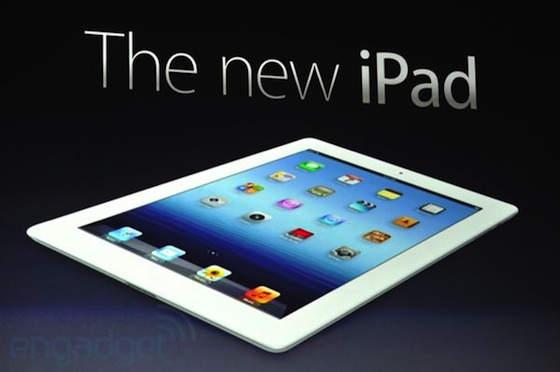
On March 8, 2012, Apple introduced its "new iPad" with great expectation and fanfare. It was generally greeted with a loud "meh." And those people are missing an important insight.
For example, CNN reported "REVIEW: NEW IPAD NEITHER DUD NOR 'REVOLUTION.' On first glance, the new, never-to-be-actually-named iPad is exactly the same as its predecessor: Same size, same price, same colors."

Polishing a Great Product

with the new iPad, there isn't much more to bring to a great design other than a noticeable increase in display resolution and initially invisible increased compute power and G4 cellular network speed. And you get all of this for the same price as the last generation.
This trend was initially observed by Moore's law in 1965 - technology doubles in capability every year (plus or minus) for the same price. (For a great overview, check out Moore's Law on Wikipedia).

Most Users Miss the Value

If a tablet just replaces books, magazines, and TV screens, then advances in network speed and compute power get overlooked or ignored.
Most iPads get used as an entertainment device. These users won't think that the new iPad has much value because they don't believe that there is any advantage to them.
And that's where most people ignore and miss out on what's really happening. The reality is that higher quality video and a better resolution display demands more compute power and network bandwidth. And this offers much more capability that only a few will recognize and capitalize.

Exponential Improvements

The iPad 2 is twice as powerful as its predecessor in terms of compute power and networking speed. And the new iPad is twice as powerful again. This makes the new iPad four times more powerful then the original.
There is no reason to think that the next generation iPad won't be twice as powerful again. So in five years, the "iPad 8" will be 128 times more powerful than the original.

The Power User's Advantage

Power users will find ways to use that to their advantage. For example, if a Google search occurs in half the time, you can accomplish more. If voice commands -- three times faster than typing -- improves productivity, you become freed to do other things. If you can see more on the higher-resolution screen, then you can take in more information in a single page, speeding your tasks.
If you really want to benefit from the exponential technology curve, figure out how to use the rapidly advancing compute and network power of devices like the iPad. Get ahead of the curve with your ideas and products. In the next 24 months, you'll be able to bring to market products that 99.9% of people can't even imagine right now.

Saturday, 10 March 2012

How To Create Iphone Apps


You may have thought that not everyone could create iPhone apps, but you would be wrong. You have seen how some guy from nowhere USA, got wealthy by creating an app and you think you have a great idea of your own but that you do not have to skills to make it a reality. The truth is that it does not take a rocket scientist to create iPhone apps that will sell and be useful. If you have ever thought that you could improve on an existing app or make a totally new one keep reading to find out how.

The thing that frightens most people that want to create iPhone apps is the programming and graphics. They think that since they have no experience with these that making an app for iPhone or other mobile devices will be difficult, nothing could be farther from the truth. Take the app "Angry Birds"; a professional team of programmers created it but one app that is just as popular was created by 14 year old. That's right a kid created Bubble saga and it is more popular by far than Angry Birds.

There are literally a few hundred online courses that teach you how to create iPhone apps. These are done using tutorials that breakdown the entire "programming lingo" down to plain English so that you fully understand the process. If this still seems too time consuming you can find software that is downloadable. These have programs that you can use or modify slightly to create an iPhone app that is unique.

In addition to these options there are websites and other platforms that even offer templates that help you to create iPhone apps. The first thing you need to do is to familiarize yourself with the developing tools and once you get a handle on this you can go just about anywhere with your programming. Making apps calls for the use of a vivid imagination. It is a process that will take your being able to see the different layers that need to be developed to make a game fun and exciting or to visualize what the end results of function should be.

Now that you know there is a way for you to create iPhone apps there is one thing you have to do before you begin this journey. In a word "RESEARCH", this may be the single most important part of the app creation. You want to look for a category of apps that has a great demand but very few competitors. The more competition there is for a category the harder it will be for you to sell your app. If you do go for one with a lot of players you have to come up with the most unique and useful idea and be the first to get it out there. Making apps can be done, even with no experience check out these links for more information.

Anissa Williams

Galaxy Tab 2 And IPad Comparison


Samsung and Apple are into court battles because of the claims of the latter copying the designs of the former. The Galaxy Tabs are one of those products that said to have been copied from the iPad. But amidst the controversies, it had enjoyed some success behind Apple. It provided some alternative for those who either have no money to spend on shinier devices or just hate all products by Steve Jobs.
Users are expecting another product when the Galaxy Tabs 2 was announced. This was during the time when the rumors of the release of the iPad 3. But when the news about the specifications of the new tablets by Samsung came out, there was nothing to be impressed about.
All the hardware remained the same as the original. There is the dual-core NVIDIA Tegra 2 which is the same with the one on the Galaxy Tab 7.0 Plus. This processor is not an improvement over the original's Exynos processor. Actually, the Exynos is faster at is clocked at 1.2 GHz while the Tegra 2 is clocked at only 1 GHz.
The screen resolution is also the same which is depressing for Galaxy Tab loyalists. This is probably because of the news that the iPad 3 will have retina display and their favorite tablet has no improvements on this area. The 10-inch version will remain at 800 by 1280 pixels and the seven-inch version will stay at 600 by 1024 pixels.
While tablets are now transitioning to 4G LTE connectivity, the Galaxy Tab 2 remains at 3G. Just like the original, you have a choice between 3G and Wi-Fi and Wi-Fi only models. The speeds are the same as original: 21 MB/s for download and 5.76 MB/s for upload.
The only improvement on the Galaxy Tab 2 is the interface as it now sports the latest Android version, Ice Cream Sandwich. This version is the best looking version of Google's mobile OS besides offering a slew of new features. Ice Cream Sandwich is Android's answer to the simple elegance of Apples iOS 5.
With all of these, it seems like the Galaxy Tab 2 is just the original upgraded to the latest Android OS. ICS is good but we would have expected something better in terms of hardware from a company such as Samsung like what ASUS did with their Transformer Pad. There could have been added functions such as NFC or, as mentioned, support for 4G LTE. No prices have been released yet for these devices. But there are rumors that they will be sold at a lesser price than the original. If this is true then the Tabs are worth a look in terms of practicality. But performance wise, the new tablets by Samsung are depressing.

What is Cloud Computing ?


The term 'Cloud Computing' was born in the middle of 2007. The word 'Cloud' is a metaphor to describe the Internet. So it can be explained simply as computing (applications, storage, services etc.) residing on the Internet which the users connect to.
For example, if you are using web applications from big firms such as Google or Microsoft, it means that you are using Cloud Computing. The web applications such as Gmail, Google Calendar, Hotmail, Salesforce, Dropbox and Google Docs are all Cloud Computing services because when connecting to those services, the users will access to massive integrated server groups on the Internet.
Why using Cloud Computing:
Generally, large corporations install certain applications on servers to provide lower costs (shared storage, management, architecture etc.) and distributed connectivity (e.g. global access). With Cloud Computing, resources are shared, so a single email server may serve 500 companies instead of 500 companies needing to buy their own internal email server for example. Therefore, it reduces the cost arising from individual companies hosting their own services locally. As saying above, the word 'Cloud' refers to the Internet.
Currently, many companies have posted their applications to the Internet and have integrated features through a web browser allowing connectivity from different computing platforms (Windows, Mac, Linux etc.)
What does Cloud Computing have to do for your business:
Easier: If usually run their applications on their own servers that are placed in their offices, it requires local effort for maintenance, the cost and the time to keep things running continuously and upgrading. If they use it, they will still use the same applications but the applications will be implemented on an Internet facing server. In many cases, the maintenance, upgrading and running of the server is handles by a data center or application provider. Further, they can also let their users or associates use the applications without having to install anything to their computers.
More efficient: Have you ever thought that your company will use Office 360 or Google Docs instead of Microsoft Office or Open Office? From cloud services, the company doesn't have to spend large amounts of money on licensing fees, maintenance, updating etc. It's all carried out without them needing to be too concerned.
The drawback of office application based cloud computing is that it is completely dependent on a reliable internet service. Also a slow internet connection can make the experience unpleasant if there are long delays between doing different function.
Much cheaper: There are no capital expenditures upfront (no need to buy servers etc.) and most services grow as your needs grow so you only pay for what you need. The cost is also easier to bear for the small companies.
Flexible: A global solution designed to suit your needs. It is quickly adaptable if your needs change. You might add or remove users and set up regular or spike access time.
Secure: More sophisticated security system but interdependent with the company operating the servers and may not be suitable for confidential data.

Friday, 9 March 2012

The New Sony Tablet P Review


Sony Tablet P sets itself apart from other Android tablets . It boasts a 1 GHZ Dual core Cpu , 4 GB of internal storage and Android 3.2.1 . It Also has 3G connectivity .
The tablet is now for sale.

Video Review :


  Memory :

A 2 GB SD Memory that can be expanded to 32 GB is supplied .

   Software :

The Tablet runs Android 3.2.1 . There is a fair amount of lag and sluggishness present all over the OS.
Dual Core screen Apps
Playstaion certification : Sony Tablet P is a playstation certified device , With the four log placed near the hinge . This means That you can play original PSone games.


   Battery life :

Two Screens totalling 11 inches means a lot for the tablet P's battery power , which is why there is a gigantic 3,080 mAh battery inside the rear cover and its removable.

   Cameras : 

The tablet P's rear facing 5 mega pixels camera is functional , its slow and produces soft, noisy photos . it can shoot 720 P video . Also with  a front facing 0.3 mega pixelss shooter that is comically awful.

     Audio :

The lone external speaker is all too soft , evident when you listen to music without headphones inside pandora

     Pricing :

$399.99 with two-year AT&T contract or $549.99 without.


Best Android Apps 2012

Best Android Weather Apps:


The Weather Channel provides the most accurate and relevant weather information whenever weather matters to you.


 Animated Weather forecast: realistic video effects, detailed world data. Free!
Digital Clock widget 4x2 with Weather forecast application and live wallpapers. The exquisitely realistic video effects of cloudiness, rain and snow provide the vivid sensation of current or future weather conditions for more than 50000 locations over the world.


 GO Weather is an amazing weather app. Cool UI, 3D Videos.

Best Android Utilities Apps: 


This Application makes your notes searchable , you can capture photos and record voices.


This app Allows you to access your files from any Browser as well as your mobile device . This makes your content more secure.


This app contain A math feature that makes you solve a simple question to dismiss it . This way you know when its really time to get out of bed.


Best Android Entertainment Apps


Google Music allows you to access your library from mobile or desktop browser across platforms . Its free and offer free songs to download.


Mobile weight loss and cardio trainer that allows you to map out a run , track your distance over time or log in your weight loss goals.


TweetDeck :

Tweet deck is a good option because it integrates twitter , facebook and foursquare .

Life Is Better With Google Play

Twitter Delicious Facebook Digg Stumbleupon Favorites More